+34 644 99 01 34Free demo

The POS for cafés that keeps the queue moving.

The POS and management software for your café: you charge at the counter without opening a table, ring up every milk and every extra, and know what each coffee earns you.

Book a free demo5.0+100 Google reviews

The terms, before you ask.

  • No lock-inYou stay because it pays off
  • No commissionwhen you take payment with your own card terminal or in cash
  • Unlimited licencestake orders from any phone
  • VeriFactu and TicketBAIincluded
  • Support 365 days a yearby phone and WhatsApp

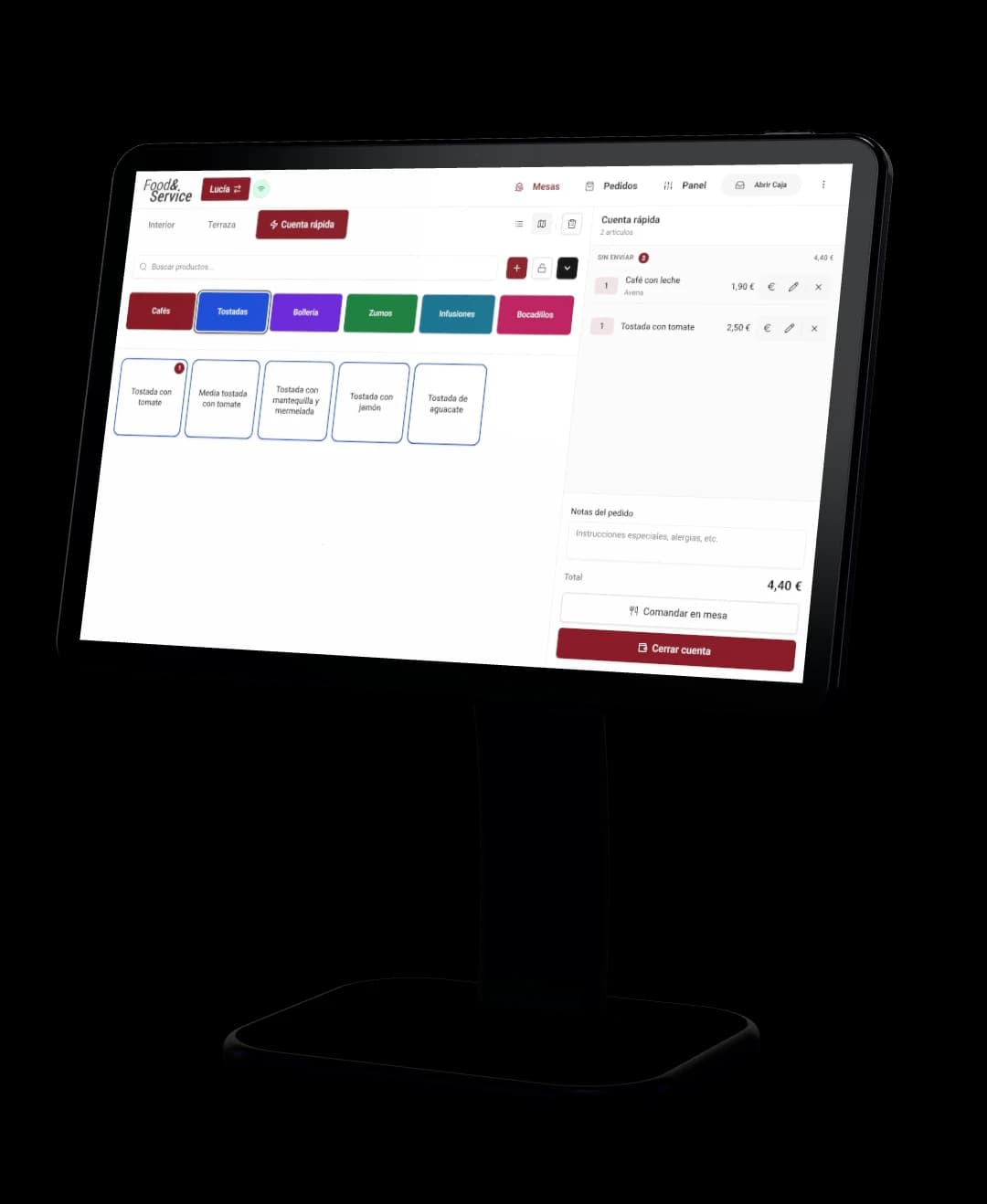
At the counter, no table needed.

The quick tab comes switched on: tap the coffee, pick the milk and take card or cash. If the customer sits down, you move their bill to a table.

  • Every extra at its own priceoat, lactose-free, decaf or an extra shot
  • Breakfast comboscoffee and toast at a set price
  • Each item to its printerthe coffee at the bar, the toast in the kitchen

And on the terrace, from a phone.

Your waiters take orders on their own phones and the order reaches the bar instantly. Licences are unlimited: sign up the whole team, extra weekend staff included.

  • Terrace supplement+€0.20 added automatically at the outside tables
  • Unlimited licencesno paying per phone
  • Android and iOSon the phone they already carry

You stop paying separately forWaiter handheldsPer-device licences

You know what every coffee earns you.

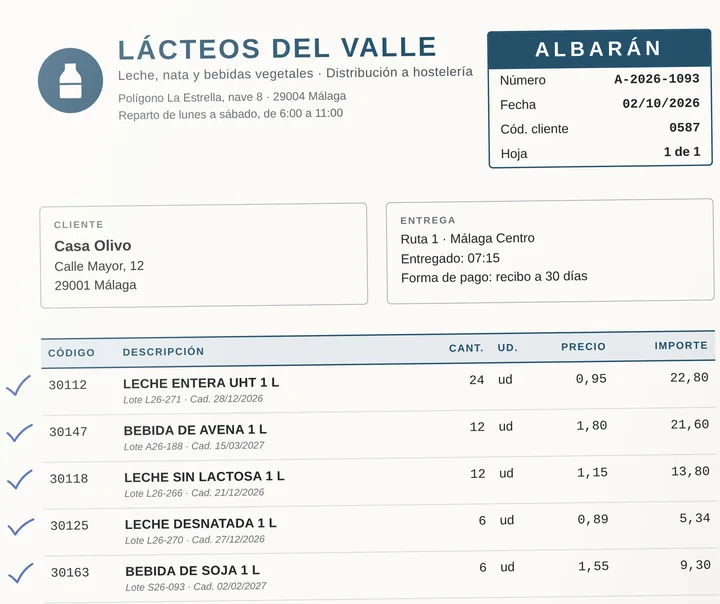
Take a photo of the milk delivery note or send it on WhatsApp. The AI reads it, you approve it, the stock goes in by itself and the recipe cost of every coffee recalculates with the new price.

From the milk delivery note to the margin on every coffee.

Oat drink costs you €0.13 more than whole milk and you charge €0.30 for it: every oat latte earns you €0.15 more. And if the invoice doesn’t match the delivery notes, it flags it.

You stop paying separately forExpenses softwareInventory software

See Expenses with AI

What runs out and what’s left over.

When the croissants run out, they stop selling by themselves on the POS and on the QR menu. If the oat drink runs out, the “Oat” option stops showing. And whatever you throw away at closing, you log in one tap and see how much money goes on waste.

  • Comes off the menu by itselfand back on when you restock
  • What’s about to run out“Running low” and “Out of stock” at a glance
  • Waste in euroswhat you bin at closing, with “I threw something away”
  • Pickup ordersSunday’s cake, ordered from your website

Six stamps, a coffee on the house.

Your stamp card, no paper and no app: guests join from the QR menu, every paid bill adds a stamp and the free coffee goes on the bill when they pay. They carry it on their phone, in Apple Wallet or Google Wallet too.

  • Café template6 stamps and a coffee, change it as you like
  • One stamp per paid billone a day at most, with nobody writing it down
  • Birthdays and campaignsby WhatsApp or email, to those who opt in

Morning shift, afternoon shift. Each with its own till.

Each shift opens and closes its own till: you count the cash, match the card takings against the card terminal and see the difference to the cent.

Cash-up per shift and PIN clock-ins.

What came in as cash and by card on each shift, no calculator needed. And everyone clocks in and out on the same POS.

You stop paying separately forClock-in app

See time tracking

Your busiest hours, at a glance.

The Analytics heat map shows you which hours and days you sell the most, so you know when you need two people behind the bar.

See analytics

What your café no longer needs.

  • The cake order notebook
  • The calculator for cashing up
  • The clock-in sheet
  • The spreadsheet of what a coffee costs
  • The milk delivery notes in the drawer
  • The notebook of what gets thrown away

One system. The rest can go.

Cake orders, cash-ups, clock-ins, recipe costs and delivery notes all run from the same system you take payment with.

Book a free demo

What the people who use it say.

5.0+100 reviews on Google
Watch the story
Denis, from Cafetería Aretha

La plataforma de FYS TPV funciona muy bien: es clara, práctica y bastante completa. Además, el equipo de atención al cliente responde rápido y siempre con muy buena disposición. Muy satisfecha con el servicio.

Ristorante da Monicaon Google
  • Ely Torrejon

    Programa muy rápido y fácil de gestionar, con todos los servicios. Los chicos te atienden muy rápido para cualquier duda, llaman enseguida. Muy recomendable.

  • Nicolas Cotoner

    Sencillo e intuitivo, el servicio al cliente es magnífico. Rápido y eficiente. Muy contento con la aplicación, la recomiendo sin ninguna duda.

  • Polo

    Todo muy rápido y muy ágil, de momento todo como esperaba. Satisfacción por escogeros.

  • Maria del carmen Porras

    Me atendieron Eugenio y Gabriel ambos muy atentos y simpáticos. Por ahora muy contenta con el programa es muy completo y la asistencia por si tengo alguna duda o algún problema son rápidos.

  • Janire Moura

    Un equipo increíble a la altura del programa más completo de hostelería que he visto. Resuelven dudas rápido y bien, están para lo que necesites. Y el software completísimo, una maravilla. Una suerte haberlos encontrado! ❤️

  • Jhosep Mejia delgado

    Excelente experiencia con FoodyService. Desde el primer momento, el trato ha sido profesional, cercano y muy atento. Destaco especialmente la rapidez, la buena comunicación y la disposición para resolver cualquier duda o incidencia. Da gusto trabajar con una empresa que se preocupa de verdad por ofrecer un buen servicio y facilitar las cosas al cliente. Totalmente recomendables. ¡Muchas gracias por vuestra atención y profesionalidad!

  • San Basilio

    Excelente experiencia con FoodyService. Es una plataforma muy completa, intuitiva y fácil de gestionar. La atención y el soporte técnico han sido rápidos, cercanos y muy resolutivos. Nos ha permitido modernizar la carta y mejorar notablemente la presentación de nuestros productos. Sin duda, un servicio muy recomendable para cualquier negocio de hostelería. Lo recomiendo al 100%

  • nerea garcia urueña

    Escelente

  • Wabi-Sabi Cuina Japonesa

    O atendimento foi excelente desde o início: comercial explica bem os itens inclusos no plano escolhido e depois com a equipe de suporte, no nosso caso foi o Eugenio que nos atendeu, foram rápidos e profissionais. Tudo que temos de duvida ele nos orienta rapidamente e a aplicação é simples e intuitiva de trabalhar.

  • Keli Martins

    Desde o primeiro contato até a instalação e depois com a utilização do sistema é tudo muito tranquilo e fácil. O atendimento é excelente e muito profissional. Eu troquei de aplicação e essa está me atendendo com muita qualidade, tem tudo que necesitamos e consigo acompanhar tudo da minha casa .

  • Nicole Ceolin

    Super Manuel! Mi ha installato il programma per la cassa nel mio locale in Fuengirola. É stato attento e professionale, con molta pazienza mi ha mostrato come utilizzare il programma e ha risposto a tutte le mie domande. Sono davvero soddisfatta! Consigliatissimo ;)

  • Amz

    Acierto total con esta empresa para mi nuevo TPV con comanderos, sistema completo. En cuanto al software super completo pero super amigable, fácil, práctico, completo, ideal. Y si quiero destacar a Manu, el técnico que nos ha acompañado en la instalación, profesional, conocedor sin dudar en ninguna de las muchas dudas que le hemos preguntado, y amable como ninguno. Deseando estrenarlo !!!Muchas gracias por todo

What cafés ask us.

Another question? Write to us

  • What kind of POS does a café need?

    One that charges fast at the counter, charges for every extra and tells you what each coffee costs you. Food&Service has a quick tab, extras with prices, an order pad on the phone, inventory with recipe costing and VeriFactu, and it works on a tablet, computer or phone.

  • Can I charge at the counter without opening a table?

    Yes. The quick tab comes switched on: you add what they order and charge straight away. If the customer sits down, you move their bill to a table with “Send to a table”.

  • How do I charge for oat milk, decaf or an extra shot?

    With extras groups, for example “Milk type”, each option with its own price. You can make it required so the waiter has to choose, and switch an option off when you run out.

  • Can I charge more on the terrace?

    Yes. You set a supplement per area, for example +€0.20 on the Terrace, and the POS adds it automatically at those tables. With bulk editing you apply it to the whole menu at once.

  • How do I know what each coffee costs me?

    With its recipe costing: the grams of coffee and the millilitres of milk, each at its purchase price. When you upload the delivery note to Expenses, the AI reads it, the stock updates and the cost of every coffee recalculates.

  • What happens when the pastries run out?

    You mark them as sold out and “Out of stock” shows on the POS and the QR menu. If you track them in inventory, they come off the menu by themselves when they run out and come back when you restock.

  • Do I need to buy a new POS?

    No need. Food&Service runs in the browser of the tablet, computer or phone you already have, and there’s an Android app. If you need a card terminal, printer or cash drawer, the Food&Service shop has them at customer prices.

  • Can I see which hours I sell the most?

    Yes. In Analytics, the heat map shows your sales by hour and by day of the week, so you can decide how many people you need for each slot.

  • Can my café have a stamp card?

    Yes, with no paper and no app. You pick the café template (6 stamps and a free coffee) and change it as you like. Guests join from the QR menu with their phone number or email, every paid bill adds a stamp (one a day at most) and the free coffee arrives as a coupon that is applied when they pay. They can also save the card in Apple Wallet or Google Wallet.

  • Does the same POS work if my café is also a bar?

    Yes. The same POS charges at the counter without opening a table, runs the tables inside and on the terrace and sends each order to its printer or to the kitchen display, from the morning coffee to the evening beers.

  • Touchscreen POS or tablet: which is better for a café?

    Food&Service works on both: in the browser of a touchscreen POS, a tablet, a computer or a phone, and with the Android app. Licences are unlimited, so you can have the POS on the counter and a tablet on the terrace. To print receipts and orders, the printer is connected to a computer on the premises, and a Windows touchscreen POS will do.

  • Does it comply with VeriFactu and TicketBAI?

    Yes. VeriFactu and TicketBAI are included, with nothing extra to pay.

  • How much does a café POS cost?

    It depends on what you need: in the demo we give you a fixed price. There’s no lock-in contract, and if you take payments with your own card terminal or in cash, you pay no commission.

Take back control of your business.

Get your demo.

We show you Food&Service working on a case like yours and give you a fixed price, with no obligation.

Watch the demo video
  1. You fill in the form: five details.
  2. We call you within 24 hours.
  3. We show it to you and give you your price.

Rather talk now? Call us or message us on WhatsApp at 644 99 01 34, or write to hola@foodyservice.com.